Still rereading every file your AI touches? Stop. Check the four lines that changed.
Your AI will get something wrong today. The only question is whether you find it in 23 lines or in 4. Here are three ordinary workdays, three mistakes that would have shipped, and exactly what was on screen when each one got caught.
The AI priced 7 seats. The company has 5. Four marked lines gave it away.
A finance director lets an AI assistant write next year's software renewals in four passes, from a year of invoices and the vendors' quotes. She keeps renewals-2027.md open in LeanMD with Watch on, and gets on with her morning.
4 of 23lines to check when the error landed
$957overcharge caught before anyone signed
0reload prompts, all morning
Without Watch
A Reload or Keep prompt on every save, in every tab
Reread the whole document each pass to find what moved
Lose her place whenever rows land above her
The 7-seat line looks like every other line
With Watch
Each pass loads by itself, no prompt
Solid, dashed and deleted marks show exactly what moved
Source and Preview stay on the text she was reading
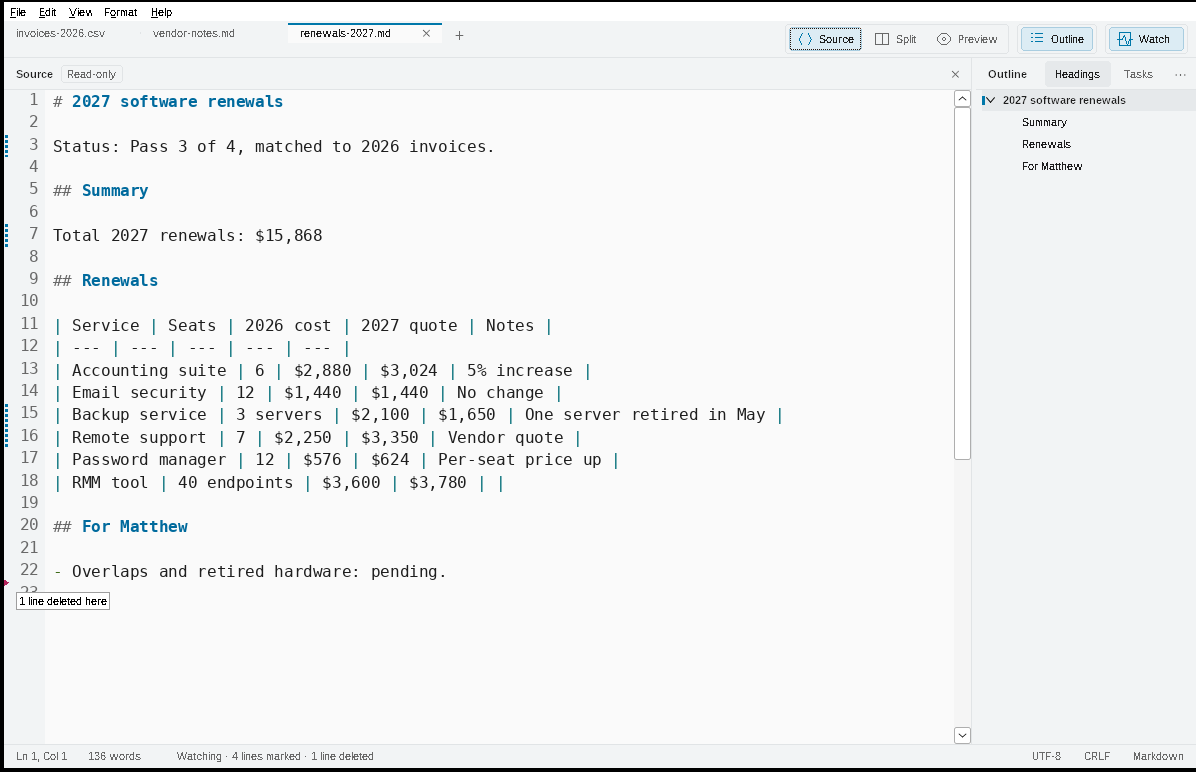
Four marked lines on pass 3, and one of them is wrong
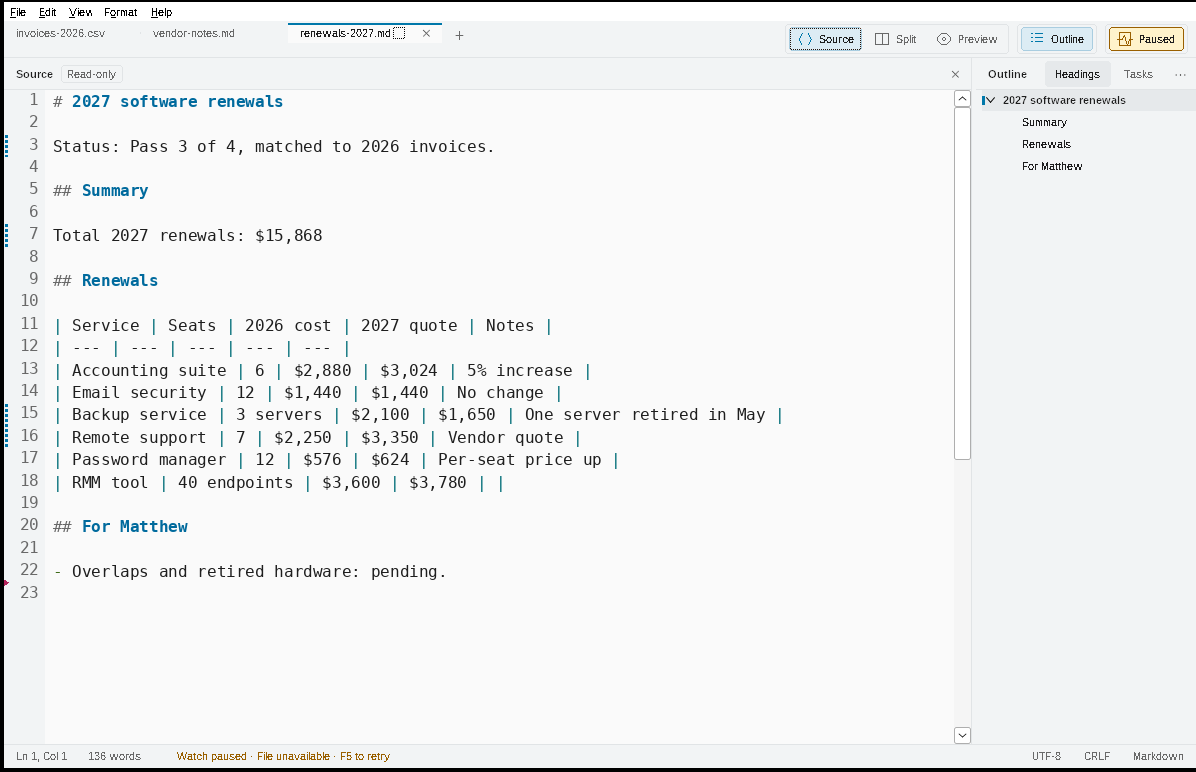
Pass 3: four lines changed, one deleted. The Remote support row is the error.The file vanished mid-save: Paused, text kept, resumed by itself.
The morning, step by step
8:55
Two files, one click each
She presses Ctrl+Shift+W on renewals-2027.md, and right-clicks the vendor-notes.md tab > Watch this file without switching to it. Status: Watching · Read-only.
9:20
Pass 1 lands on its own
No prompt. The Outline fills in, 14 lines are marked. She skims the structure and chooses Clear changes.
9:48
Rows land above her
She has jumped to For Matthew when six rows are inserted above it. The heading stays at the top of both panes; it is now line 20 instead of 14.
10:03
The file vanishes
The assistant's tool deletes the file and writes it again. Watch shows Paused and File unavailable, keeps the text on screen, and picks up again on its own.
10:12
The catch
Four lines marked, plus a triangle: 1 line deleted here. Remote support: $3,350 for 7 seats; they have 5. The deleted line was a note that two tools overlap. She tells the assistant. She can't type in the watched file, so she can't edit a copy about to be replaced.
10:31
Only the fix is marked
Pass 4 marks the corrected row, the new Total and Status, and the restored note. Nothing else moved. The background tab updated three times without ever taking focus.
10:40
Out the door
Stop Watch, add one sentence, File > Export as HTML for the approver, and right-click the other tab > Copy full path for the IT director.
Rereading the whole document four times is the check people skip. Checking four marked lines is the check people actually do.
Example 2 · Watch, encodings, line endings · IT
This is the one that loses data.
The agent halved the backup retention. It took seconds to see.
A systems technician moves a client's nightly backups from an old Windows file server to a new NAS. A coding agent writes the plan, the script and the runbook. LeanMD sits beside it all day.
30 → 14days of retention, changed quietly in revision 3
1 clickto fix the bash\r line-endings failure
~2.5 hback in the day (estimate)
Without LeanMD
Reread every revision of the plan to find what the agent changed
A garbled 2012 log, and an agent searching for the wrong spelling
Half an hour lost to /usr/bin/env: 'bash\r'
Whitespace noise in every commit
With LeanMD
Four marked lines, and Retention: 14 days is one of them
File > Reopen with encoding > Windows-1252, and Café is back
The status bar said CRLF. One click > Linux / Unix (LF)
Format > Clean Source, one Undo step, code blocks untouched
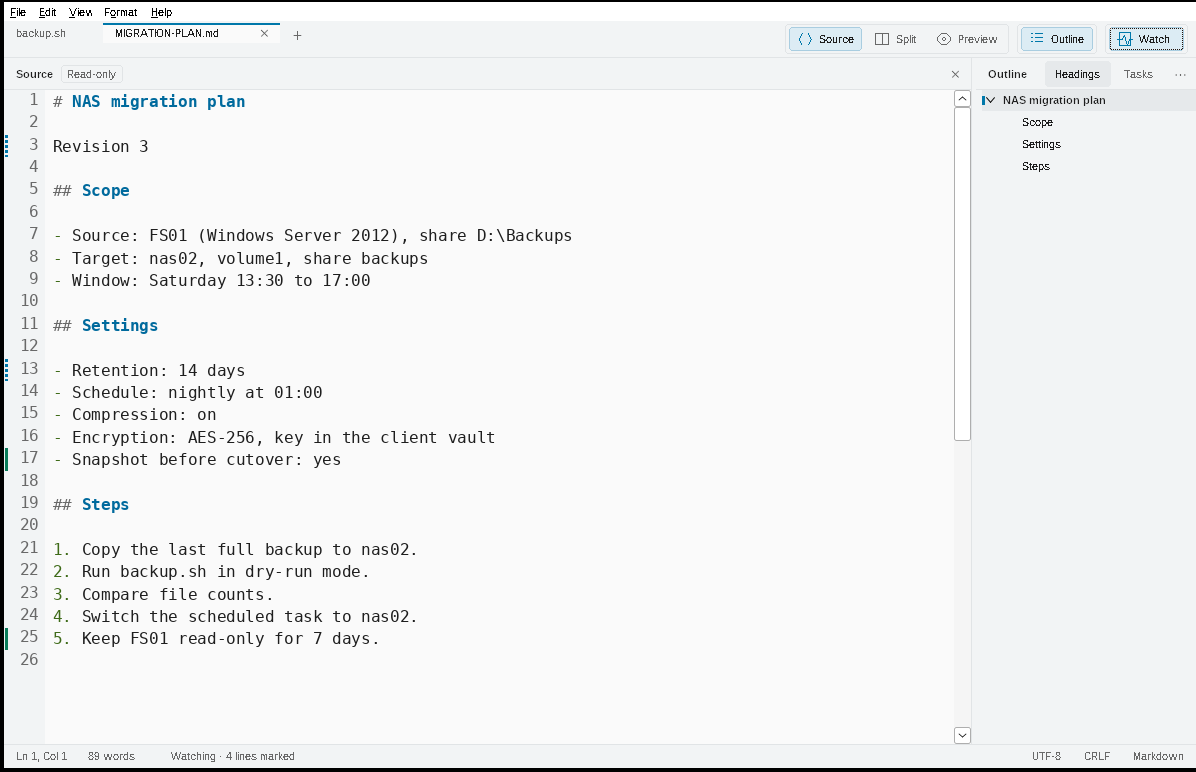
Revision 3: four marked lines. Line 13 is the one that matters.
The day, step by step
8:30
Real files, not guesses
Right-click each tab > Copy full path, paste into the prompt. The agent reads the actual config.
Revision 3 marks four lines. Retention: 14 days used to say 30. He tells the agent to put it back.
10:15
The ^M trap
The script dies with 'bash\r'. The status bar already said CRLF. Click it > Linux / Unix (LF), and it runs.
11:00
Clean commit
Format > Clean Source (Ctrl+Shift+F) strips the agent's trailing spaces in one Undo step.
1:30
The cutover
The Outline jumps to Rollback in a 600-line runbook. Find with Match case and Match whole word hits TARGET and skips TARGET_OLD.
4:00
Hand-over
File > Export as HTML for the client, right-click the tab > Open containing folder to attach it.
Where the 2.5 hours come from (estimates)
Moment
Without
With LeanMD
Saved
Finding what the agent changed, 4 revisions
~12 min each
~2 min each
~40 min
bash\r line-endings failure
~30 min
~1 min
~29 min
Garbled legacy log
~20 min
~1 min
~19 min
Opening ~40 files to check
~30 s each
~3 s each
~18 min
Navigating the runbook, paths, cleanup, reloads, a restart
~47 min
Agents are fast at writing files and blind to what happens to them next. LeanMD makes the invisible visible, and fixes most of it in one click.
Example 3 · Tasks · Teams
This is the one you're paying a subscription for.
One Markdown file. The whole launch status. No project tool.
A small web team runs a website launch from one shared LAUNCH-CHECKLIST.md. Whoever finishes an item ticks it. LeanMD's Outline does the counting.
5 / 12tasks done, counted for you
3sections, each with its own count
0accounts, boards or sync
Without Tasks
Scroll the whole file and count boxes by hand
Lose track of which section is behind
Hunt for the next open item
With Tasks
Outline > Tasks: every box, grouped by heading, with 3 / 6 style counts
Headings view shows the same counts beside each section
··· > Hide completed tasks, then select one to jump to it in Source and Preview
OutlineHeadingsTasks···
Website launch checklist5 / 12
Content3 / 6
Home page copy approved
Features page updated for 1.2
Real world examples reviewed
Renewals example
Migration example
Screenshots replaced
Technical2 / 4
Sitemap updated
Redirects tested
Download checksum confirmed
Cache cleared after release
After launch0 / 2
Announce the release
Check search console in a week
Illustration of the Outline's Tasks view for this checklist.
The checklist stays plain Markdown that opens anywhere. LeanMD just does the counting, and never ticks a box for you.
The game changer
Wait. That's groupware. You just didn't pay for it.
A shared folder, some Markdown, and LeanMD. Look back at those three days. A colleague's notes updated in a background tab. A plan went to a client as one HTML page. A whole team ticked off one checklist. Nobody bought a platform. The folder you already share is the server, Markdown is the format, and LeanMD is the client.
On the cheap
$0
Free. No seats to count, no subscription, no server to run. The folder you share already exists.
Simple to use
0 new tools
It's just files. Write Markdown, tick boxes, turn on Watch. If someone can open a document, they can use it.
Effortless to deploy
1 .exe
Copy one signed LeanMD.exe to a share or a USB stick. No installer, no admin rights, no accounts to set up. LeanMD.exe --register sets up .md files for the signed-in user, so it fits a login script.
What teams usually pay for
The LeanMD way
Shared documents
Markdown files in the folder you already share. They open in anything, forever.
"What changed?" notifications
Watch: each save loads by itself, with added, changed and deleted lines marked until you clear them.
A task tracker
Tasks: - [ ] checklists, counted per section in the Outline.
Publishing for outsiders
Export as HTML: one self-contained page, no scripts, ready to email.
Accounts and an admin console
None. Your Windows folder permissions already decide who reads and who writes.
Privacy reviews
Nothing to review: no telemetry, no cloud, no update checks. LeanMD never goes online by itself.
What it isn't
It isn't real-time co-editing. One person or program writes at a time; everyone else watches, read-only, so nobody overwrites anybody. There are no comments, chat or permissions of its own: your folder's permissions apply. On network shares and sync folders, change notices from Windows can arrive late; Watch also checks the file's details as a fallback, and F5 retries a paused file.
Let the AI write. Let the team watch. Check what changed.
One signed .exe for Windows 10 and 11. No install, no account, offline.